Products and catalogue
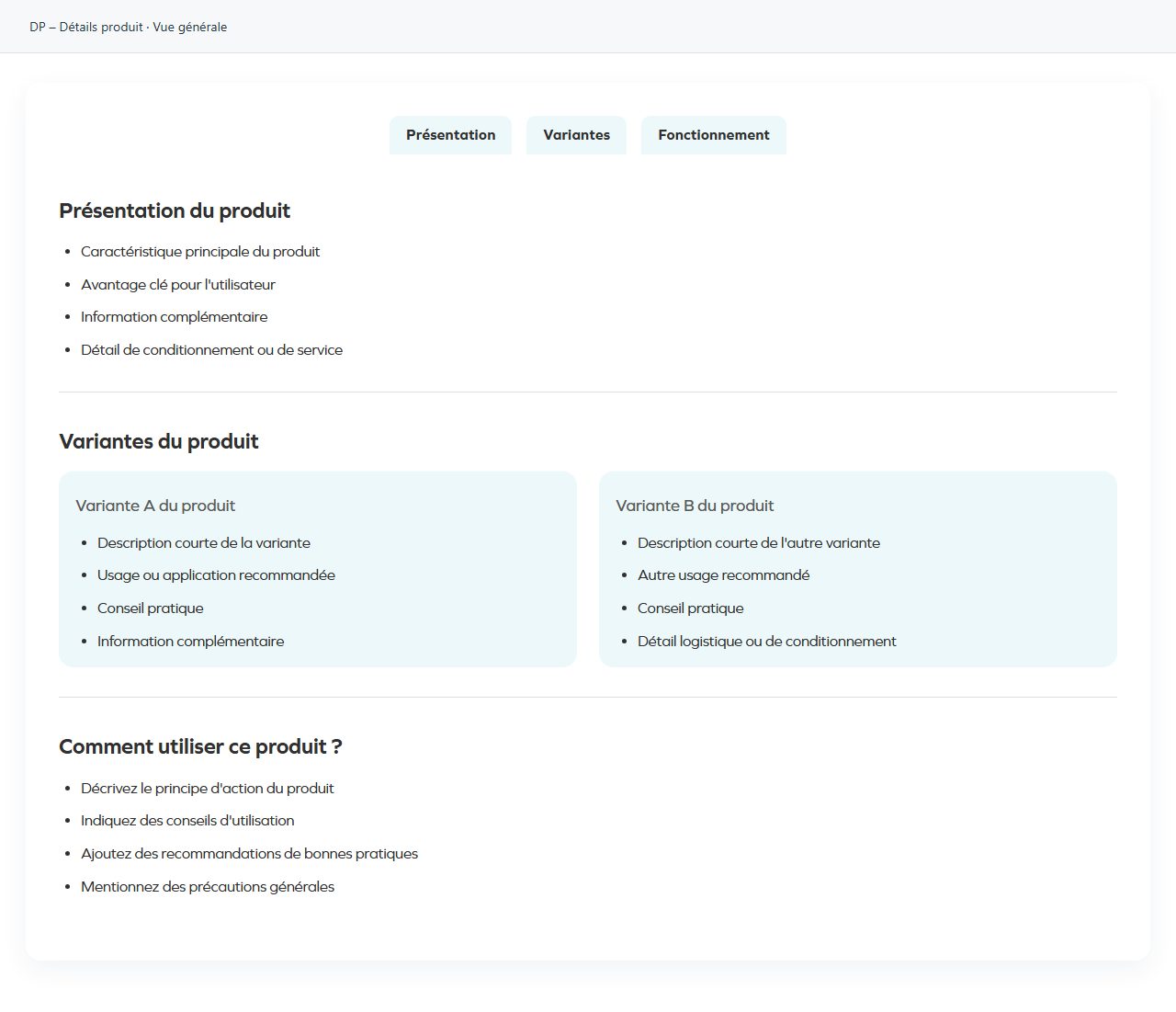
DP – Détails produit
Groups detailed product information into sections. Open Sections, check headings and content, then their order. It supports progressive reading of approved information. Do not turn required scientific information into decoration; review every section and any associated documents.
What you fill in
The content fields of this widget, in the order of the Elementor panel. Appearance settings are gathered in the reference.
Sections
| Label in the plugin | How to complete it |
|---|---|
| Sections | Open each entry; add, duplicate or reorder the items you need. |
| ↳ Titre de l'onglet | Enter short, clear text. |
| ↳ Titre de section | Enter short, clear text. |
| ↳ Disposition | Choose an available option and check its effect in the preview. Options: Liste · Colonnes · Image / vidéo · Image / vidéo + texte + bouton · Bouton (centré). |
| ↳ Éléments (un par ligne) | Enter the text, then check its length in the preview. Visible when “Disposition” is Liste. |
| ↳ Style de liste | Choose an available option and check its effect in the preview. Options: Puces · Exposant (¹, ², ³). Visible when “Disposition” is Liste, Colonnes. |
| ↳ Nombre de colonnes | Choose an available option and check its effect in the preview. Options: 1 · 2 · 3 · 4. Visible when “Disposition” is Colonnes. |
| Colonne 1 | |
| ↳ Titre colonne 1 | Enter short, clear text. Visible when “Disposition” is Colonnes. |
| ↳ Couleur de fond colonne 1 | Empty: the design colour applies. Check the contrast against the background. Visible when “Disposition” is Colonnes. |
| ↳ Largeur (%) | Laissez vide ou mettez 0 pour répartir automatiquement l’espace restant entre les autres colonnes. Visible when “Disposition” is Colonnes. |
| ↳ Alignement vertical | Choose an available option and check its effect in the preview. Options: Haut · Centre · Bas. Visible when “Disposition” is Colonnes. |
| ↳ Type colonne 1 | Choose an available option and check its effect in the preview. Options: Liste · Image / vidéo · Image / vidéo + texte · Image / vidéo + texte + bouton · Bouton (centré). Visible when “Disposition” is Colonnes. |
| ↳ Contenu colonne 1 (un par ligne) | Enter the text, then check its length in the preview. Visible when “Disposition” is Colonnes and “Type colonne 1” is Liste. |
| ↳ Type de média | Choose an available option and check its effect in the preview. Options: Image · Vidéo. Visible when “Disposition” is Colonnes and “Type colonne 1” is Image / vidéo, Image / vidéo + texte, Image / vidéo + texte + bouton, image_button. |
| ↳ Source vidéo | Choose an available option and check its effect in the preview. Options: URL YouTube/Vimeo · Media WordPress. Visible when “Disposition” is Colonnes and “Type colonne 1” is Image / vidéo, Image / vidéo + texte, Image / vidéo + texte + bouton, image_button and “Type de média” is Vidéo. |
| ↳ URL vidéo | Accepte un lien YouTube, Vimeo ou une URL directe vers un fichier vidéo. Visible when “Disposition” is Colonnes and “Type colonne 1” is Image / vidéo, Image / vidéo + texte, Image / vidéo + texte + bouton, image_button and “Type de média” is Vidéo. |
| ↳ Vidéo WordPress | Choose the appropriate media file and check the result. Visible when “Disposition” is Colonnes and “Type colonne 1” is Image / vidéo, Image / vidéo + texte, Image / vidéo + texte + bouton, image_button and “Type de média” is Vidéo. |
| ↳ Image / vidéo colonne 1 | Choose the appropriate media file and check the result. Visible when “Disposition” is Colonnes and “Type colonne 1” is Image / vidéo, Image / vidéo + texte, Image / vidéo + texte + bouton, image_button and “Type de média” is not Vidéo. |
| ↳ Texte sous le média colonne 1 | Enter the text, then check its length in the preview. Visible when “Disposition” is Colonnes and “Type colonne 1” is Image / vidéo + texte, Image / vidéo + texte + bouton. |
| ↳ Largeur max. image ordinateur (colonne 1) | From 40 to 800 px. Adjust gradually; check the target device before changing it. Visible when “Disposition” is Colonnes and “Type colonne 1” is Image / vidéo, Image / vidéo + texte, Image / vidéo + texte + bouton, image_button. |
| ↳ Largeur max. image tablette (colonne 1) | From 40 to 700 px. Adjust gradually; check the target device before changing it. Visible when “Disposition” is Colonnes and “Type colonne 1” is Image / vidéo, Image / vidéo + texte, Image / vidéo + texte + bouton, image_button. |
| ↳ Largeur max. image mobile (colonne 1) | From 40 to 500 px. Adjust gradually; check the target device before changing it. Visible when “Disposition” is Colonnes and “Type colonne 1” is Image / vidéo, Image / vidéo + texte, Image / vidéo + texte + bouton, image_button. |
| ↳ Texte bouton sous le média colonne 1 | Enter short, clear text. Visible when “Disposition” is Colonnes and “Type colonne 1” is Image / vidéo + texte + bouton, image_button. |
| ↳ Lien bouton sous le média colonne 1 | Enter the full destination and test the link in the correct language. Visible when “Disposition” is Colonnes and “Type colonne 1” is Image / vidéo + texte + bouton, image_button. |
| ↳ Couleur bouton sous le média colonne 1 | Empty: the design colour applies. Check the contrast against the background. Visible when “Disposition” is Colonnes and “Type colonne 1” is Image / vidéo + texte + bouton, image_button. |
| ↳ Texte bouton colonne 1 | Enter short, clear text. Visible when “Disposition” is Colonnes and “Type colonne 1” is Bouton (centré). |
| ↳ Lien bouton colonne 1 | Enter the full destination and test the link in the correct language. Visible when “Disposition” is Colonnes and “Type colonne 1” is Bouton (centré). |
| ↳ Couleur bouton colonne 1 | Empty: the design colour applies. Check the contrast against the background. Visible when “Disposition” is Colonnes and “Type colonne 1” is Bouton (centré). |
| Colonne 2 | |
| ↳ Titre colonne 2 | Enter short, clear text. Visible when “Disposition” is Colonnes and “Nombre de colonnes” is not 1. |
| ↳ Couleur de fond colonne 2 | Empty: the design colour applies. Check the contrast against the background. Visible when “Disposition” is Colonnes and “Nombre de colonnes” is not 1. |
| ↳ Largeur (%) | Laissez vide ou mettez 0 pour répartir automatiquement l’espace restant entre les autres colonnes. Visible when “Disposition” is Colonnes and “Nombre de colonnes” is not 1. |
| ↳ Alignement vertical | Choose an available option and check its effect in the preview. Options: Haut · Centre · Bas. Visible when “Disposition” is Colonnes and “Nombre de colonnes” is not 1. |
| ↳ Type colonne 2 | Choose an available option and check its effect in the preview. Options: Liste · Image / vidéo · Image / vidéo + texte · Image / vidéo + texte + bouton · Bouton (centré). Visible when “Disposition” is Colonnes and “Nombre de colonnes” is not 1. |
| ↳ Contenu colonne 2 (un par ligne) | Enter the text, then check its length in the preview. Visible when “Disposition” is Colonnes and “Nombre de colonnes” is not 1 and “Type colonne 2” is Liste. |
| ↳ Type de média | Choose an available option and check its effect in the preview. Options: Image · Vidéo. Visible when “Disposition” is Colonnes and “Nombre de colonnes” is not 1 and “Type colonne 2” is Image / vidéo, Image / vidéo + texte, Image / vidéo + texte + bouton, image_button. |
| ↳ Source vidéo | Choose an available option and check its effect in the preview. Options: URL YouTube/Vimeo · Media WordPress. Visible when “Disposition” is Colonnes and “Nombre de colonnes” is not 1 and “Type colonne 2” is Image / vidéo, Image / vidéo + texte, Image / vidéo + texte + bouton, image_button. |
| ↳ URL vidéo | Accepte un lien YouTube, Vimeo ou une URL directe vers un fichier vidéo. Visible when “Disposition” is Colonnes and “Nombre de colonnes” is not 1 and “Type colonne 2” is Image / vidéo, Image / vidéo + texte, Image / vidéo + texte + bouton, image_button. |
| ↳ Vidéo WordPress | Choose the appropriate media file and check the result. Visible when “Disposition” is Colonnes and “Nombre de colonnes” is not 1 and “Type colonne 2” is Image / vidéo, Image / vidéo + texte, Image / vidéo + texte + bouton, image_button. |
| ↳ Image / vidéo colonne 2 | Choose the appropriate media file and check the result. Visible when “Disposition” is Colonnes and “Nombre de colonnes” is not 1 and “Type colonne 2” is Image / vidéo, Image / vidéo + texte, Image / vidéo + texte + bouton, image_button. |
| ↳ Texte sous le média colonne 2 | Enter the text, then check its length in the preview. Visible when “Disposition” is Colonnes and “Nombre de colonnes” is not 1 and “Type colonne 2” is Image / vidéo + texte, Image / vidéo + texte + bouton. |
| ↳ Texte bouton colonne 2 | Enter short, clear text. Visible when “Disposition” is Colonnes and “Nombre de colonnes” is not 1 and “Type colonne 2” is Bouton (centré). |
| ↳ Lien bouton colonne 2 | Enter the full destination and test the link in the correct language. Visible when “Disposition” is Colonnes and “Nombre de colonnes” is not 1 and “Type colonne 2” is Bouton (centré). |
| ↳ Couleur bouton colonne 2 | Empty: the design colour applies. Check the contrast against the background. Visible when “Disposition” is Colonnes and “Nombre de colonnes” is not 1 and “Type colonne 2” is Bouton (centré). |
| ↳ Largeur max. image ordinateur (colonne 2) | From 40 to 800 px. Adjust gradually; check the target device before changing it. Visible when “Disposition” is Colonnes and “Nombre de colonnes” is not 1 and “Type colonne 2” is Image / vidéo, Image / vidéo + texte, Image / vidéo + texte + bouton, image_button. |
| ↳ Largeur max. image tablette (colonne 2) | From 40 to 700 px. Adjust gradually; check the target device before changing it. Visible when “Disposition” is Colonnes and “Nombre de colonnes” is not 1 and “Type colonne 2” is Image / vidéo, Image / vidéo + texte, Image / vidéo + texte + bouton, image_button. |
| ↳ Largeur max. image mobile (colonne 2) | From 40 to 500 px. Adjust gradually; check the target device before changing it. Visible when “Disposition” is Colonnes and “Nombre de colonnes” is not 1 and “Type colonne 2” is Image / vidéo, Image / vidéo + texte, Image / vidéo + texte + bouton, image_button. |
| ↳ Texte bouton sous le média colonne 2 | Enter short, clear text. Visible when “Disposition” is Colonnes and “Nombre de colonnes” is not 1 and “Type colonne 2” is Image / vidéo + texte + bouton, image_button. |
| ↳ Lien bouton sous le média colonne 2 | Enter the full destination and test the link in the correct language. Visible when “Disposition” is Colonnes and “Nombre de colonnes” is not 1 and “Type colonne 2” is Image / vidéo + texte + bouton, image_button. |
| ↳ Couleur bouton sous le média colonne 2 | Empty: the design colour applies. Check the contrast against the background. Visible when “Disposition” is Colonnes and “Nombre de colonnes” is not 1 and “Type colonne 2” is Image / vidéo + texte + bouton, image_button. |
| Colonne 3 | |
| ↳ Titre colonne 3 | Enter short, clear text. Visible when “Disposition” is Colonnes and “Nombre de colonnes” is 3, 4. |
| ↳ Couleur de fond colonne 3 | Empty: the design colour applies. Check the contrast against the background. Visible when “Disposition” is Colonnes and “Nombre de colonnes” is 3, 4. |
| ↳ Largeur (%) | Laissez vide ou mettez 0 pour répartir automatiquement l’espace restant entre les autres colonnes. Visible when “Disposition” is Colonnes and “Nombre de colonnes” is 3, 4. |
| ↳ Alignement vertical | Choose an available option and check its effect in the preview. Options: Haut · Centre · Bas. Visible when “Disposition” is Colonnes and “Nombre de colonnes” is 3, 4. |
| ↳ Type colonne 3 | Choose an available option and check its effect in the preview. Options: Liste · Image / vidéo · Image / vidéo + texte · Image / vidéo + texte + bouton · Bouton (centré). Visible when “Disposition” is Colonnes and “Nombre de colonnes” is 3, 4. |
| ↳ Contenu colonne 3 (un par ligne) | Enter the text, then check its length in the preview. Visible when “Disposition” is Colonnes and “Nombre de colonnes” is 3, 4 and “Type colonne 3” is Liste. |
| ↳ Type de média | Choose an available option and check its effect in the preview. Options: Image · Vidéo. Visible when “Disposition” is Colonnes and “Nombre de colonnes” is 3, 4 and “Type colonne 3” is Image / vidéo, Image / vidéo + texte, Image / vidéo + texte + bouton, image_button. |
| ↳ Source vidéo | Choose an available option and check its effect in the preview. Options: URL YouTube/Vimeo · Media WordPress. Visible when “Disposition” is Colonnes and “Nombre de colonnes” is 3, 4 and “Type colonne 3” is Image / vidéo, Image / vidéo + texte, Image / vidéo + texte + bouton, image_button. |
| ↳ URL vidéo | Accepte un lien YouTube, Vimeo ou une URL directe vers un fichier vidéo. Visible when “Disposition” is Colonnes and “Nombre de colonnes” is 3, 4 and “Type colonne 3” is Image / vidéo, Image / vidéo + texte, Image / vidéo + texte + bouton, image_button. |
| ↳ Vidéo WordPress | Choose the appropriate media file and check the result. Visible when “Disposition” is Colonnes and “Nombre de colonnes” is 3, 4 and “Type colonne 3” is Image / vidéo, Image / vidéo + texte, Image / vidéo + texte + bouton, image_button. |
| ↳ Image / vidéo colonne 3 | Choose the appropriate media file and check the result. Visible when “Disposition” is Colonnes and “Nombre de colonnes” is 3, 4 and “Type colonne 3” is Image / vidéo, Image / vidéo + texte, Image / vidéo + texte + bouton, image_button. |
| ↳ Texte sous le média colonne 3 | Enter the text, then check its length in the preview. Visible when “Disposition” is Colonnes and “Nombre de colonnes” is 3, 4 and “Type colonne 3” is Image / vidéo + texte, Image / vidéo + texte + bouton. |
| ↳ Texte bouton colonne 3 | Enter short, clear text. Visible when “Disposition” is Colonnes and “Nombre de colonnes” is 3, 4 and “Type colonne 3” is Bouton (centré). |
| ↳ Lien bouton colonne 3 | Enter the full destination and test the link in the correct language. Visible when “Disposition” is Colonnes and “Nombre de colonnes” is 3, 4 and “Type colonne 3” is Bouton (centré). |
| ↳ Couleur bouton colonne 3 | Empty: the design colour applies. Check the contrast against the background. Visible when “Disposition” is Colonnes and “Nombre de colonnes” is 3, 4 and “Type colonne 3” is Bouton (centré). |
| ↳ Largeur max. image ordinateur (colonne 3) | From 40 to 800 px. Adjust gradually; check the target device before changing it. Visible when “Disposition” is Colonnes and “Nombre de colonnes” is 3, 4 and “Type colonne 3” is Image / vidéo, Image / vidéo + texte, Image / vidéo + texte + bouton, image_button. |
| ↳ Largeur max. image tablette (colonne 3) | From 40 to 700 px. Adjust gradually; check the target device before changing it. Visible when “Disposition” is Colonnes and “Nombre de colonnes” is 3, 4 and “Type colonne 3” is Image / vidéo, Image / vidéo + texte, Image / vidéo + texte + bouton, image_button. |
| ↳ Largeur max. image mobile (colonne 3) | From 40 to 500 px. Adjust gradually; check the target device before changing it. Visible when “Disposition” is Colonnes and “Nombre de colonnes” is 3, 4 and “Type colonne 3” is Image / vidéo, Image / vidéo + texte, Image / vidéo + texte + bouton, image_button. |
| ↳ Texte bouton sous le média colonne 3 | Enter short, clear text. Visible when “Disposition” is Colonnes and “Nombre de colonnes” is 3, 4 and “Type colonne 3” is Image / vidéo + texte + bouton, image_button. |
| ↳ Lien bouton sous le média colonne 3 | Enter the full destination and test the link in the correct language. Visible when “Disposition” is Colonnes and “Nombre de colonnes” is 3, 4 and “Type colonne 3” is Image / vidéo + texte + bouton, image_button. |
| ↳ Couleur bouton sous le média colonne 3 | Empty: the design colour applies. Check the contrast against the background. Visible when “Disposition” is Colonnes and “Nombre de colonnes” is 3, 4 and “Type colonne 3” is Image / vidéo + texte + bouton, image_button. |
| Colonne 4 | |
| ↳ Titre colonne 4 | Enter short, clear text. Visible when “Disposition” is Colonnes and “Nombre de colonnes” is 4. |
| ↳ Couleur de fond colonne 4 | Empty: the design colour applies. Check the contrast against the background. Visible when “Disposition” is Colonnes and “Nombre de colonnes” is 4. |
| ↳ Largeur (%) | Laissez vide ou mettez 0 pour répartir automatiquement l’espace restant entre les autres colonnes. Visible when “Disposition” is Colonnes and “Nombre de colonnes” is 4. |
| ↳ Alignement vertical | Choose an available option and check its effect in the preview. Options: Haut · Centre · Bas. Visible when “Disposition” is Colonnes and “Nombre de colonnes” is 4. |
| ↳ Type colonne 4 | Choose an available option and check its effect in the preview. Options: Liste · Image / vidéo · Image / vidéo + texte · Image / vidéo + texte + bouton · Bouton (centré). Visible when “Disposition” is Colonnes and “Nombre de colonnes” is 4. |
| ↳ Contenu colonne 4 (un par ligne) | Enter the text, then check its length in the preview. Visible when “Disposition” is Colonnes and “Nombre de colonnes” is 4 and “Type colonne 4” is Liste. |
| ↳ Type de média | Choose an available option and check its effect in the preview. Options: Image · Vidéo. Visible when “Disposition” is Colonnes and “Nombre de colonnes” is 4 and “Type colonne 4” is Image / vidéo, Image / vidéo + texte, Image / vidéo + texte + bouton, image_button. |
| ↳ Source vidéo | Choose an available option and check its effect in the preview. Options: URL YouTube/Vimeo · Media WordPress. Visible when “Disposition” is Colonnes and “Nombre de colonnes” is 4 and “Type colonne 4” is Image / vidéo, Image / vidéo + texte, Image / vidéo + texte + bouton, image_button. |
| ↳ URL vidéo | Accepte un lien YouTube, Vimeo ou une URL directe vers un fichier vidéo. Visible when “Disposition” is Colonnes and “Nombre de colonnes” is 4 and “Type colonne 4” is Image / vidéo, Image / vidéo + texte, Image / vidéo + texte + bouton, image_button. |
| ↳ Vidéo WordPress | Choose the appropriate media file and check the result. Visible when “Disposition” is Colonnes and “Nombre de colonnes” is 4 and “Type colonne 4” is Image / vidéo, Image / vidéo + texte, Image / vidéo + texte + bouton, image_button. |
| ↳ Image / vidéo colonne 4 | Choose the appropriate media file and check the result. Visible when “Disposition” is Colonnes and “Nombre de colonnes” is 4 and “Type colonne 4” is Image / vidéo, Image / vidéo + texte, Image / vidéo + texte + bouton, image_button. |
| ↳ Texte sous le média colonne 4 | Enter the text, then check its length in the preview. Visible when “Disposition” is Colonnes and “Nombre de colonnes” is 4 and “Type colonne 4” is Image / vidéo + texte, Image / vidéo + texte + bouton. |
| ↳ Texte bouton colonne 4 | Enter short, clear text. Visible when “Disposition” is Colonnes and “Nombre de colonnes” is 4 and “Type colonne 4” is Bouton (centré). |
| ↳ Lien bouton colonne 4 | Enter the full destination and test the link in the correct language. Visible when “Disposition” is Colonnes and “Nombre de colonnes” is 4 and “Type colonne 4” is Bouton (centré). |
| ↳ Couleur bouton colonne 4 | Empty: the design colour applies. Check the contrast against the background. Visible when “Disposition” is Colonnes and “Nombre de colonnes” is 4 and “Type colonne 4” is Bouton (centré). |
| ↳ Largeur max. image ordinateur (colonne 4) | From 40 to 800 px. Adjust gradually; check the target device before changing it. Visible when “Disposition” is Colonnes and “Nombre de colonnes” is 4 and “Type colonne 4” is Image / vidéo, Image / vidéo + texte, Image / vidéo + texte + bouton, image_button. |
| ↳ Largeur max. image tablette (colonne 4) | From 40 to 700 px. Adjust gradually; check the target device before changing it. Visible when “Disposition” is Colonnes and “Nombre de colonnes” is 4 and “Type colonne 4” is Image / vidéo, Image / vidéo + texte, Image / vidéo + texte + bouton, image_button. |
| ↳ Largeur max. image mobile (colonne 4) | From 40 to 500 px. Adjust gradually; check the target device before changing it. Visible when “Disposition” is Colonnes and “Nombre de colonnes” is 4 and “Type colonne 4” is Image / vidéo, Image / vidéo + texte, Image / vidéo + texte + bouton, image_button. |
| ↳ Texte bouton sous le média colonne 4 | Enter short, clear text. Visible when “Disposition” is Colonnes and “Nombre de colonnes” is 4 and “Type colonne 4” is Image / vidéo + texte + bouton, image_button. |
| ↳ Lien bouton sous le média colonne 4 | Enter the full destination and test the link in the correct language. Visible when “Disposition” is Colonnes and “Nombre de colonnes” is 4 and “Type colonne 4” is Image / vidéo + texte + bouton, image_button. |
| ↳ Couleur bouton sous le média colonne 4 | Empty: the design colour applies. Check the contrast against the background. Visible when “Disposition” is Colonnes and “Nombre de colonnes” is 4 and “Type colonne 4” is Image / vidéo + texte + bouton, image_button. |
| ↳ Type de média | Choose an available option and check its effect in the preview. Options: Image · Vidéo. Visible when “Disposition” is Image / vidéo, image_button, Image / vidéo + texte + bouton. |
| ↳ Source vidéo | Choose an available option and check its effect in the preview. Options: URL YouTube/Vimeo · Media WordPress. Visible when “Disposition” is Image / vidéo, image_button, Image / vidéo + texte + bouton and “Type de média” is Vidéo. |
| ↳ URL vidéo | Accepte un lien YouTube, Vimeo ou une URL directe vers un fichier vidéo. Visible when “Disposition” is Image / vidéo, image_button, Image / vidéo + texte + bouton and “Type de média” is Vidéo and “Source vidéo” is URL YouTube/Vimeo. |
| ↳ Vidéo WordPress | Choose the appropriate media file and check the result. Visible when “Disposition” is Image / vidéo, image_button, Image / vidéo + texte + bouton and “Type de média” is Vidéo and “Source vidéo” is Media WordPress. |
| ↳ Image / vidéo | Choose the appropriate media file and check the result. Visible when “Disposition” is Image / vidéo, image_button, Image / vidéo + texte + bouton and “Type de média” is not Vidéo. |
| ↳ Largeur max. image ordinateur | From 50 to 1200 px. Adjust gradually; check the target device before changing it. Visible when “Disposition” is Image / vidéo, image_button, Image / vidéo + texte + bouton. |
| ↳ Largeur max. image tablette | From 50 to 1000 px. Adjust gradually; check the target device before changing it. Visible when “Disposition” is Image / vidéo, image_button, Image / vidéo + texte + bouton. |
| ↳ Largeur max. image mobile | From 40 to 700 px. Adjust gradually; check the target device before changing it. Visible when “Disposition” is Image / vidéo, image_button, Image / vidéo + texte + bouton. |
| ↳ Légende | Enter the text, then check its length in the preview. Visible when “Disposition” is Image / vidéo, image_button, Image / vidéo + texte + bouton. |
| ↳ Texte sous le média | Enter the text, then check its length in the preview. Visible when “Disposition” is Image / vidéo + texte + bouton. |
| ↳ Texte bouton sous le média | Enter short, clear text. Visible when “Disposition” is image_button, Image / vidéo + texte + bouton. |
| ↳ Lien bouton sous le média | Enter the full destination and test the link in the correct language. Visible when “Disposition” is image_button, Image / vidéo + texte + bouton. |
| ↳ Couleur bouton sous le média | Empty: the design colour applies. Check the contrast against the background. Visible when “Disposition” is image_button, Image / vidéo + texte + bouton. |
| ↳ Nombre de boutons | Choose an available option and check its effect in the preview. Options: 1 · 2 · 3 · 4. Visible when “Disposition” is Bouton (centré). |
| ↳ Disposition des boutons | Choose an available option and check its effect in the preview. Options: Côte à côte · L'un sous l'autre. Visible when “Disposition” is Bouton (centré). |
| ↳ Texte bouton 1 | Enter short, clear text. Visible when “Disposition” is Bouton (centré). |
| ↳ Lien bouton 1 | Enter the full destination and test the link in the correct language. Visible when “Disposition” is Bouton (centré). |
| ↳ Couleur bouton 1 | Empty: the design colour applies. Check the contrast against the background. Visible when “Disposition” is Bouton (centré). |
| Bouton 2 | |
| ↳ Texte bouton 2 | Enter short, clear text. Visible when “Disposition” is Bouton (centré) and “Nombre de boutons” is 2, 3, 4. |
| ↳ Lien bouton 2 | Enter the full destination and test the link in the correct language. Visible when “Disposition” is Bouton (centré) and “Nombre de boutons” is 2, 3, 4. |
| ↳ Couleur bouton 2 | Empty: the design colour applies. Check the contrast against the background. Visible when “Disposition” is Bouton (centré) and “Nombre de boutons” is 2, 3, 4. |
| Bouton 3 | |
| ↳ Texte bouton 3 | Enter short, clear text. Visible when “Disposition” is Bouton (centré) and “Nombre de boutons” is 3, 4. |
| ↳ Lien bouton 3 | Enter the full destination and test the link in the correct language. Visible when “Disposition” is Bouton (centré) and “Nombre de boutons” is 3, 4. |
| ↳ Couleur bouton 3 | Empty: the design colour applies. Check the contrast against the background. Visible when “Disposition” is Bouton (centré) and “Nombre de boutons” is 3, 4. |
| Bouton 4 | |
| ↳ Texte bouton 4 | Enter short, clear text. Visible when “Disposition” is Bouton (centré) and “Nombre de boutons” is 4. |
| ↳ Lien bouton 4 | Enter the full destination and test the link in the correct language. Visible when “Disposition” is Bouton (centré) and “Nombre de boutons” is 4. |
| ↳ Couleur bouton 4 | Empty: the design colour applies. Check the contrast against the background. Visible when “Disposition” is Bouton (centré) and “Nombre de boutons” is 4. |
Available designs
Overall view
Overall widget view. Use the content and options explained in this entry to adapt it to your page.