Conversion and services
DP – Questionnaire
Associates questions with a journey, optionally including video and certification. Enter questions and answers; prefix correct answers with an asterisk and check the choice type. Use for an approved learning activity. Test passing and failing, required fields and messages; certificates and criteria must match the approved journey.
What you fill in
The content fields of this widget, in the order of the Elementor panel. Appearance settings are gathered in the reference.
Vidéo de formation
| Label in the plugin | How to complete it |
|---|---|
| Mode d'affichage | Choose an available option and check its effect in the preview. Options: Formulaire seul (pas de vidéo) · Vidéo d'abord, formulaire caché · Vidéo + formulaire affichés ensemble. |
| Source | Choose an available option and check its effect in the preview. Options: YouTube · Vimeo · Fichier hébergé (WordPress). Visible when “Mode d'affichage” is not Formulaire seul (pas de vidéo). |
| URL YouTube | Enter short, clear text. Visible when “Mode d'affichage” is not Formulaire seul (pas de vidéo) and “Source” is YouTube. |
| URL Vimeo | Enter short, clear text. Visible when “Mode d'affichage” is not Formulaire seul (pas de vidéo) and “Source” is Vimeo. |
| Fichier vidéo | Choose the appropriate media file and check the result. Visible when “Mode d'affichage” is not Formulaire seul (pas de vidéo) and “Source” is Fichier hébergé (WordPress). |
| Image d'aperçu (poster) | Pour YouTube, la miniature est récupérée automatiquement si vide. Visible when “Mode d'affichage” is not Formulaire seul (pas de vidéo). |
| Format | Choose an available option and check its effect in the preview. Options: 16:9 · 4:3 · 1:1 · 21:9 · 9:16 (vertical). Visible when “Mode d'affichage” is not Formulaire seul (pas de vidéo). |
| Légende / titre de la vidéo | Enter short, clear text. Visible when “Mode d'affichage” is not Formulaire seul (pas de vidéo). |
| Afficher les contrôles | Turn the option on or off, then check what appears. Visible when “Mode d'affichage” is not Formulaire seul (pas de vidéo). |
| Muet | Turn the option on or off, then check what appears. Visible when “Mode d'affichage” is not Formulaire seul (pas de vidéo). |
| Lecture en boucle | Turn the option on or off, then check what appears. Visible when “Mode d'affichage” is not Formulaire seul (pas de vidéo). |
| Texte du bouton « Accéder au questionnaire » | Affiché sous la vidéo (mode « Vidéo d'abord ») et lors du revisionnage imposé après épuisement des tentatives. Visible when “Mode d'affichage” is not Formulaire seul (pas de vidéo). |
| Limiter le nombre de tentatives | Après ce nombre de tentatives ratées, le participant doit revisionner la vidéo avant de pouvoir refaire le questionnaire. Visible when “Mode d'affichage” is not Formulaire seul (pas de vidéo). |
| Nombre de tentatives avant de revoir la vidéo | Enter a value suitable for the content and check the result. Visible when “Mode d'affichage” is not Formulaire seul (pas de vidéo) and “Limiter le nombre de tentatives” is enabled. |
| Message « tentatives restantes » | Affiché après un échec tant qu'il reste des tentatives. Utilisez {n} pour le nombre restant. Visible when “Mode d'affichage” is not Formulaire seul (pas de vidéo) and “Limiter le nombre de tentatives” is enabled. |
| Message « tentatives épuisées » | Enter the text, then check its length in the preview. Visible when “Mode d'affichage” is not Formulaire seul (pas de vidéo) and “Limiter le nombre de tentatives” is enabled. |
| Texte du bouton « Revoir la vidéo » | Enter short, clear text. Visible when “Mode d'affichage” is not Formulaire seul (pas de vidéo) and “Limiter le nombre de tentatives” is enabled. |
Introduction
| Label in the plugin | How to complete it |
|---|---|
| Titre | Enter short, clear text. |
| Texte d’introduction | Enter the text, then check its length in the preview. |
| Texte du bouton « Commencer » | Enter short, clear text. |
Informations participant
| Label in the plugin | How to complete it |
|---|---|
| Demander : Prénom | Turn the option on or off, then check what appears. |
| Obligatoire | Turn the option on or off, then check what appears. Visible when “Demander : Prénom” is enabled. |
| Demander : Nom | Turn the option on or off, then check what appears. |
| Obligatoire | Turn the option on or off, then check what appears. Visible when “Demander : Nom” is enabled. |
| Demander : Email | Turn the option on or off, then check what appears. |
| Obligatoire | Turn the option on or off, then check what appears. Visible when “Demander : Email” is enabled. |
| Demander : Cabinet / Clinique | Turn the option on or off, then check what appears. |
| Obligatoire | Turn the option on or off, then check what appears. Visible when “Demander : Cabinet / Clinique” is enabled. |
| Demander : Code postal | Turn the option on or off, then check what appears. |
| Obligatoire | Turn the option on or off, then check what appears. Visible when “Demander : Code postal” is enabled. |
| Demander : Ville | Turn the option on or off, then check what appears. |
| Obligatoire | Turn the option on or off, then check what appears. Visible when “Demander : Ville” is enabled. |
| Champs additionnels | Open each entry; add, duplicate or reorder the items you need. |
| ↳ Libellé | Enter short, clear text. |
| ↳ Nom technique (slug) | Enter short, clear text. |
| ↳ Obligatoire | Turn the option on or off, then check what appears. |
Questions
| Label in the plugin | How to complete it |
|---|---|
| Liste des questions | Open each entry; add, duplicate or reorder the items you need. |
| ↳ Question | Enter the text, then check its length in the preview. |
| ↳ Type de réponse | Choose an available option and check its effect in the preview. Options: Une seule bonne réponse · Plusieurs bonnes réponses. |
| ↳ Réponses (une par ligne) | Préfixez d’un astérisque * les bonnes réponses. Ex : *Réponse correcte. |
| Afficher la barre de progression | Turn the option on or off, then check what appears. |
| Texte du bouton « Valider » | Enter short, clear text. |
| Texte du bouton « Suivant » | Enter short, clear text. |
| Texte du bouton « Précédent » | Enter short, clear text. |
Résultat & validation
| Label in the plugin | How to complete it |
|---|---|
| Pourcentage de validation (%) | Enter a value suitable for the content and check the result. |
| Afficher le score | Turn the option on or off, then check what appears. |
| Titre – Réussite | Enter short, clear text. |
| Message – Réussite | Enter the text, then check its length in the preview. |
| Titre – Échec | Enter short, clear text. |
| Message – Échec | Enter the text, then check its length in the preview. |
| Texte du bouton « Réessayer » | Enter short, clear text. |
Certificat
| Label in the plugin | How to complete it |
|---|---|
| Délivrer un document en cas de réussite | Turn the option on or off, then check what appears. |
| Mode de délivrance | En mode manuel, le participant voit un message de confirmation ; l’attestation est ensuite émise à la main à partir de l’email reçu. Options: Certificat automatique (affiché et téléchargeable) · Attestation délivrée manuellement. Visible when “Délivrer un document en cas de réussite” is enabled. |
| Attestation – Titre | Enter short, clear text. Visible when “Délivrer un document en cas de réussite” is enabled and “Mode de délivrance” is Attestation délivrée manuellement. |
| Attestation – Message | Enter the text, then check its length in the preview. Visible when “Délivrer un document en cas de réussite” is enabled and “Mode de délivrance” is Attestation délivrée manuellement. |
| Logo | Choose the appropriate media file and check the result. Visible when “Délivrer un document en cas de réussite” is enabled and “Mode de délivrance” is Certificat automatique (affiché et téléchargeable). |
| Sur-titre | Enter short, clear text. Visible when “Délivrer un document en cas de réussite” is enabled and “Mode de délivrance” is Certificat automatique (affiché et téléchargeable). |
| Titre du certificat | Enter short, clear text. Visible when “Délivrer un document en cas de réussite” is enabled and “Mode de délivrance” is Certificat automatique (affiché et téléchargeable). |
| Texte du certificat | Affiché après le nom du participant. Visible when “Délivrer un document en cas de réussite” is enabled and “Mode de délivrance” is Certificat automatique (affiché et téléchargeable). |
| Signature / mention de bas de page | Enter short, clear text. Visible when “Délivrer un document en cas de réussite” is enabled and “Mode de délivrance” is Certificat automatique (affiché et téléchargeable). |
| Texte du bouton « Imprimer / PDF » | Enter short, clear text. Visible when “Délivrer un document en cas de réussite” is enabled and “Mode de délivrance” is Certificat automatique (affiché et téléchargeable). |
Certificat PDF téléchargeable
| Label in the plugin | How to complete it |
|---|---|
| Proposer un certificat PDF à télécharger | Turn the option on or off, then check what appears. |
| Template PDF (depuis la médiathèque) | Choose the appropriate media file and check the result. Visible when “Proposer un certificat PDF à télécharger” is enabled. |
| Titre de la formation | Utilisé pour le champ « Titre de la formation ». Si vide, le titre de l'introduction est repris. Visible when “Proposer un certificat PDF à télécharger” is enabled. |
| Champs à placer sur le PDF | Open each entry; add, duplicate or reorder the items you need. Visible when “Proposer un certificat PDF à télécharger” is enabled. |
| ↳ Information | Choose an available option and check its effect in the preview. Options: Nom + Prénom · Prénom · Nom · Email · Cabinet / Clinique · Code postal · Ville · Code postal + Ville (même ligne) …. |
| ↳ Texte personnalisé | Vous pouvez insérer {{NOM_PRENOM}}, {{DATE}}, {{SCORE}}, {{CABINET}}, {{CODE_POSTAL}}, {{VILLE}}… Visible when “Information” is Texte personnalisé. |
| ↳ Page | Enter a value suitable for the content and check the result. |
| ↳ Position X (mm) | Point d'ancrage horizontal (selon l'alignement). |
| ↳ Position Y (mm) | Enter a value suitable for the content and check the result. |
| ↳ Alignement | Choose an available option and check its effect in the preview. Options: Gauche (X = début du texte) · Centré (X = centre du texte) · Droite (X = fin du texte). |
| ↳ Taille de police (pt) | Enter a value suitable for the content and check the result. |
| ↳ Gras | Turn the option on or off, then check what appears. |
| ↳ Couleur du texte | Empty: the design colour applies. Check the contrast against the background. |
| Nom du fichier téléchargé (sans extension) | Enter short, clear text. Visible when “Proposer un certificat PDF à télécharger” is enabled. |
| Texte du bouton | Enter short, clear text. Visible when “Proposer un certificat PDF à télécharger” is enabled. |
| Afficher uniquement en cas de réussite | Turn the option on or off, then check what appears. Visible when “Proposer un certificat PDF à télécharger” is enabled. |
| Mode calibrage (grille de repérage) | Imprime une grille millimétrée sur le PDF pour repérer les coordonnées X/Y où placer chaque texte. À désactiver une fois le placement réglé. Visible when “Proposer un certificat PDF à télécharger” is enabled. |
Envoi des résultats par email
| Label in the plugin | How to complete it |
|---|---|
| Destinataire(s) (email) | Plusieurs adresses séparées par des virgules. Toutes les réponses et informations y seront envoyées. |
| Sujet de l’email | Enter short, clear text. |
Traitement des données (RGPD)
| Label in the plugin | How to complete it |
|---|---|
| Activer la case de consentement | Turn the option on or off, then check what appears. |
| Texte de consentement | Enter the text, then check its length in the preview. Visible when “Activer la case de consentement” is enabled. |
| Lien politique de confidentialité (optionnel) | Enter the full destination and test the link in the correct language. Visible when “Activer la case de consentement” is enabled. |
| Texte du lien | Enter short, clear text. Visible when “Activer la case de consentement” is enabled. |
Newsletter
| Label in the plugin | How to complete it |
|---|---|
| Proposer l'inscription à la newsletter | Affiche une case à cocher facultative. Les inscrits sont consultables et exportables dans le menu « Newsletter ». |
| Texte de la case | Enter the text, then check its length in the preview. Visible when “Proposer l'inscription à la newsletter” is enabled. |
| Inscription obligatoire pour continuer | Déconseillé : un opt-in newsletter doit normalement rester facultatif. Visible when “Proposer l'inscription à la newsletter” is enabled. |
Available designs
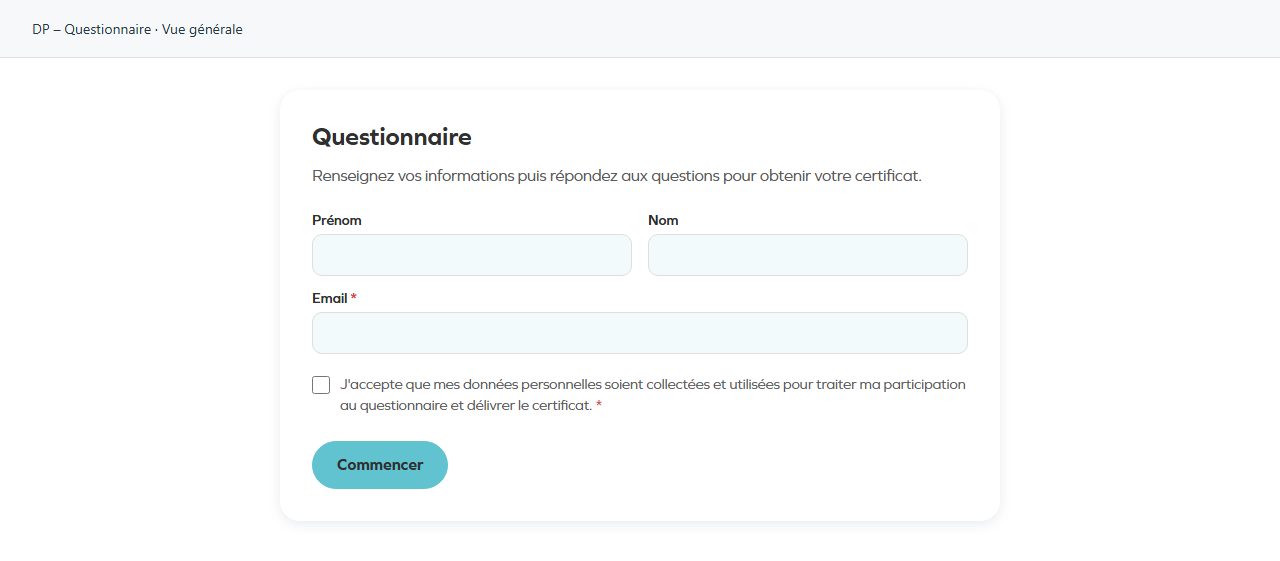
Overall view
Overall widget view. Use the content and options explained in this entry to adapt it to your page.